Skip to content

For social media, content and video agenciesManage all your clients' content in one app.

Plan posts and videos, send them to clients for approval, schedule them and track the results. Your team and your clients work in Ark, instead of spreadsheets, emails and WhatsApp groups.

Open ArkStart free

Free for up to 2 people. Clients join free. No card needed.

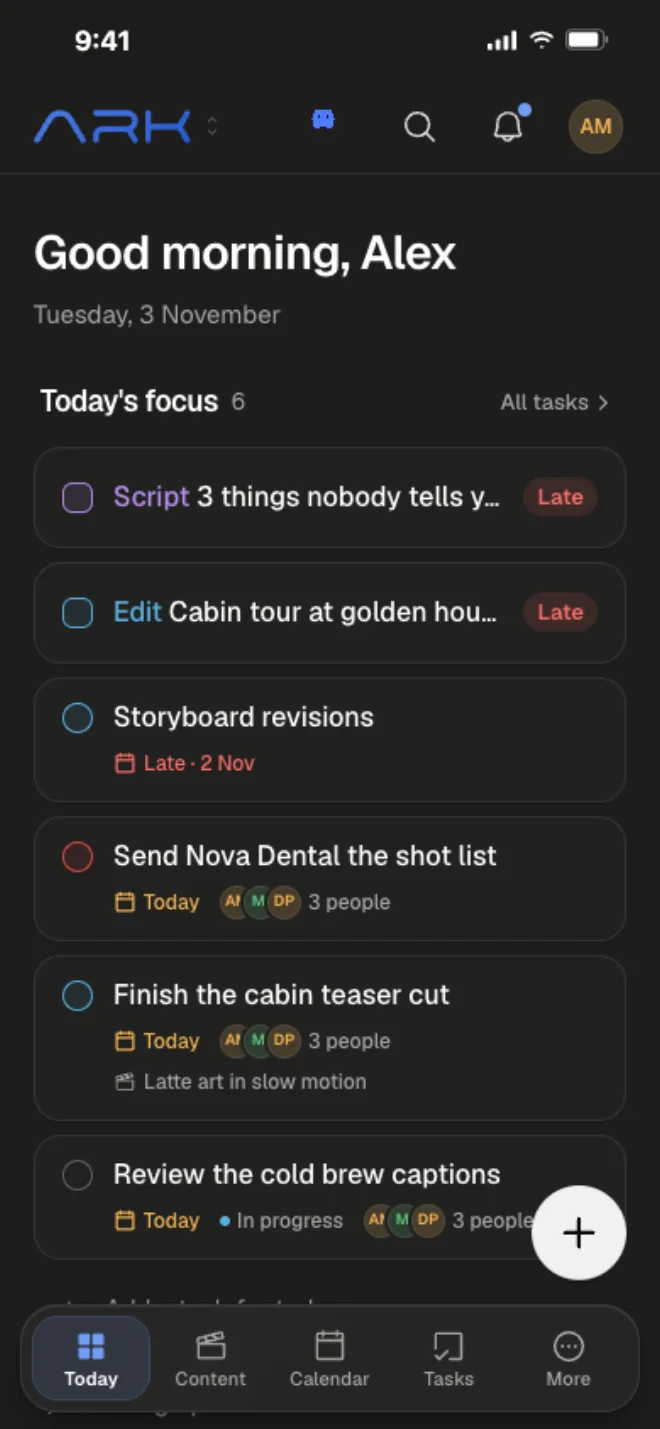
The Ark iPhone app on the Today screen, with the day's script, edit and tasks.

You don't need 13 tools to run an agency.

Ark does their jobs in one app. $19 a month for up to 6 people, and clients are free.

  • Planninginstead of Notion, Asana, Google Sheets
  • Client approvalsinstead of WhatsApp, email, Frame.io
  • Scheduling and statsinstead of Planable, Hootsuite
  • Contracts and passwordsinstead of PandaDoc, NordPass

How it works

From the first idea to the monthly report.

Here's one month of content for one client, step by step.

  1. Plan the month.

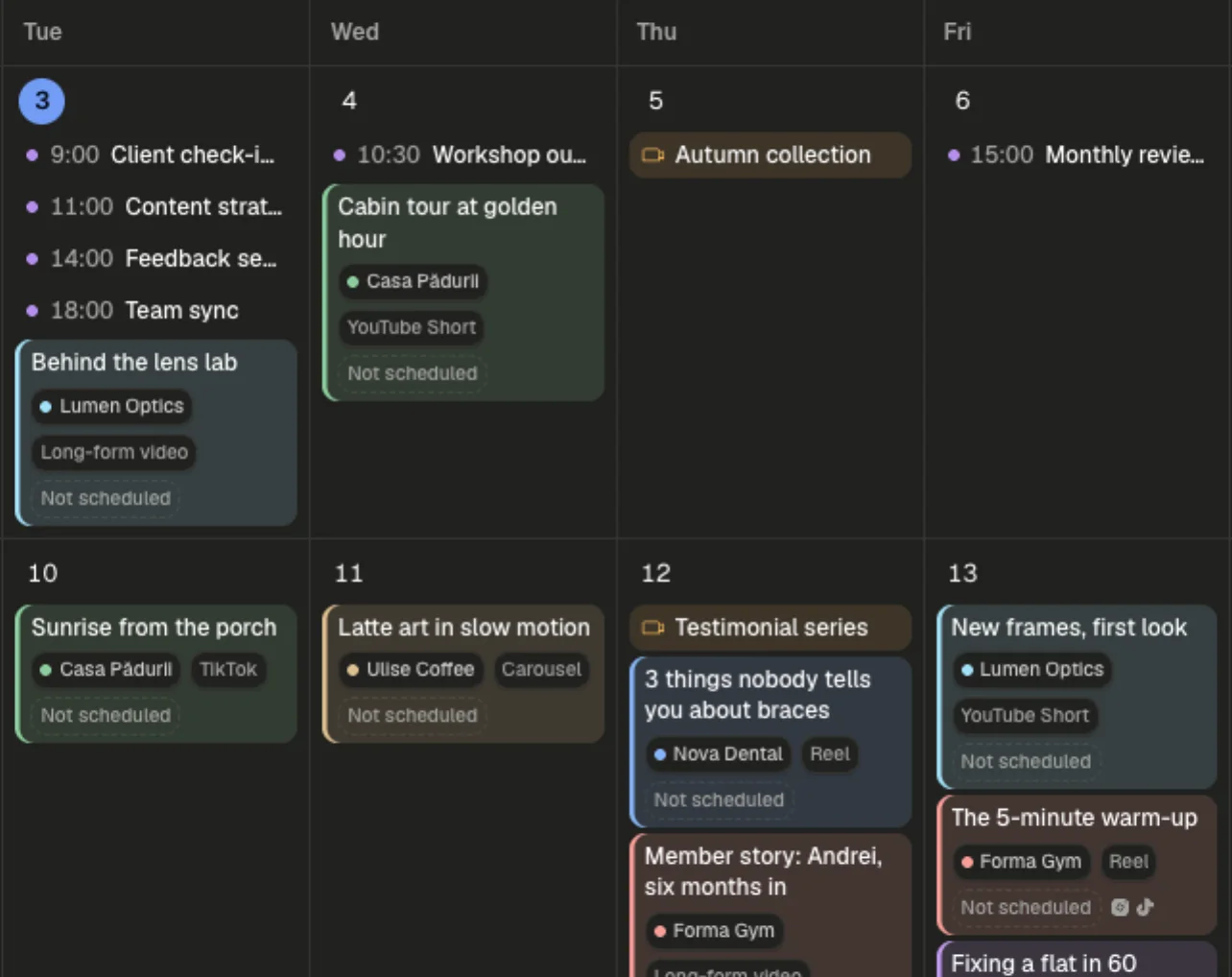
    Every post and video is a card on the board, with its date, format, caption and who's working on it. The calendar shows what goes out when.

    • Move cards from idea to posted
    • Write scripts and captions on the card
    • Syncs with Google Calendar
  2. Get the client's OK.

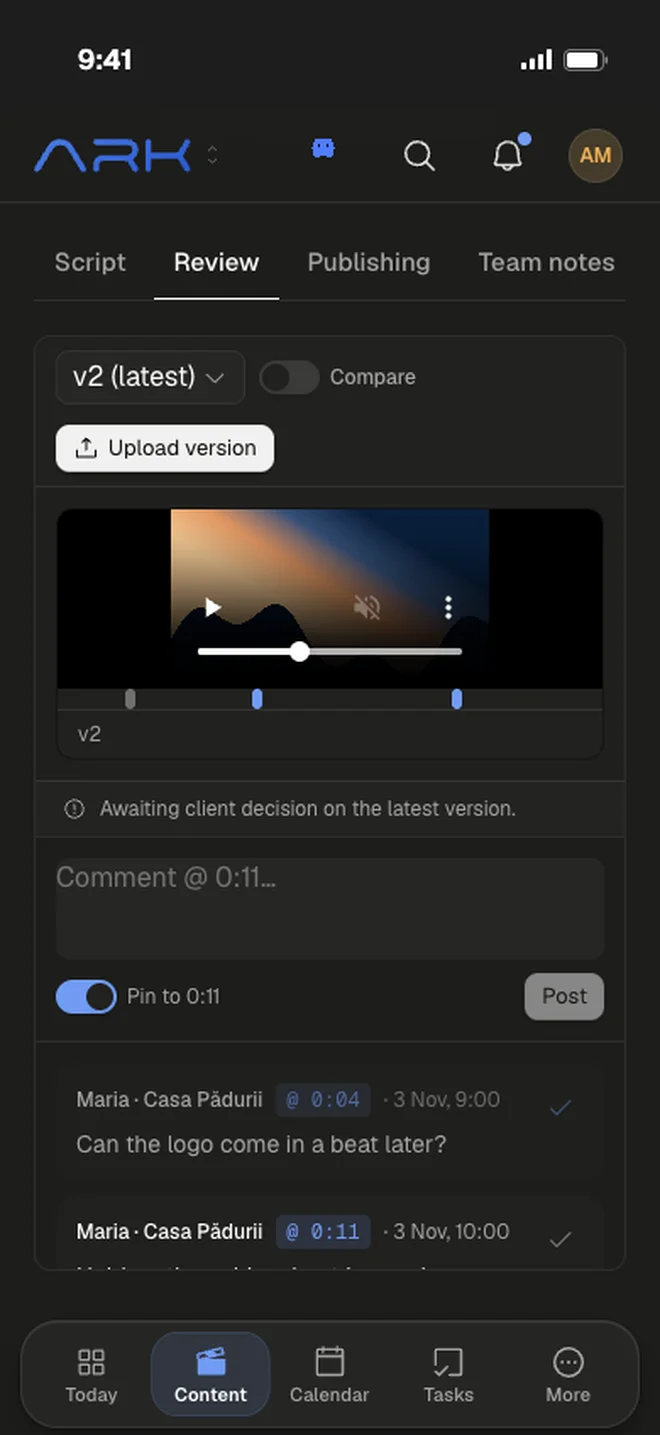
    Send the client a link. They open it on their phone, comment right on the text or the video, and tap Approve.

    • Comments on the exact line or second
    • All feedback in one place, not in WhatsApp
    • Clients only see their own work
  3. Schedule it.

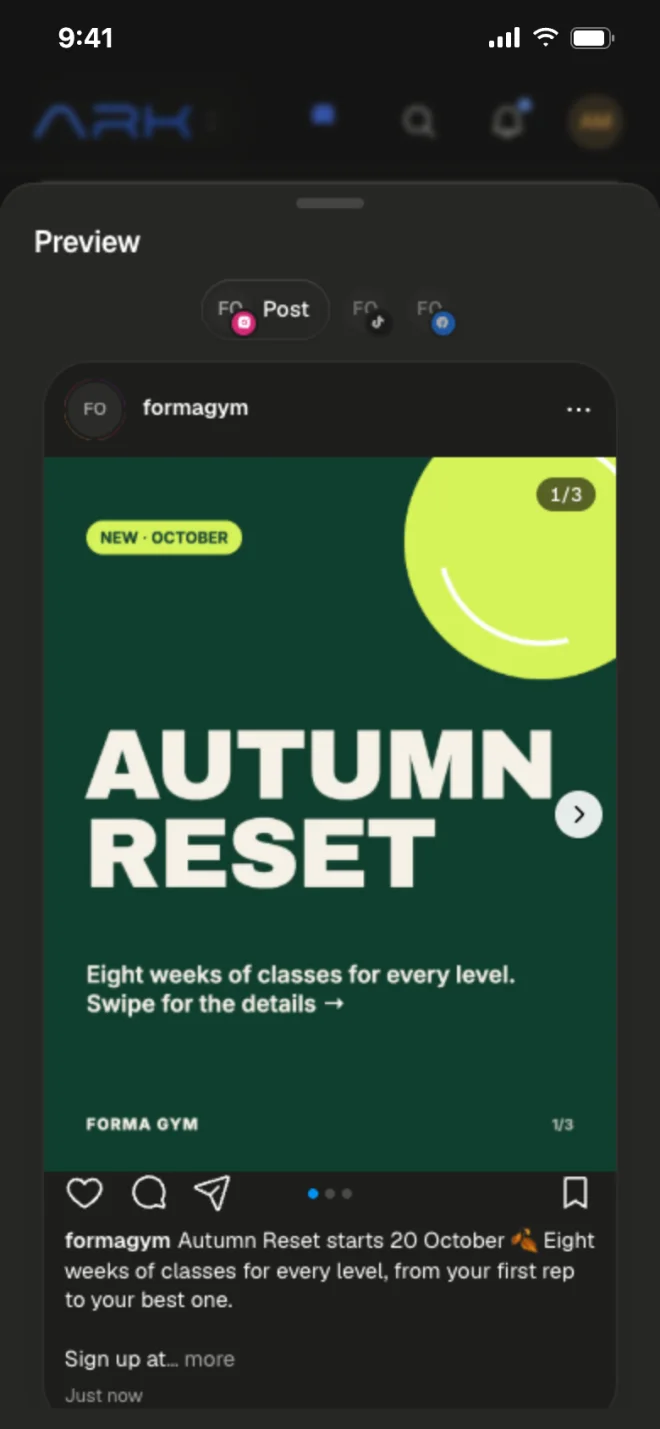
    Approved posts go on the calendar with their caption and cover. You see exactly how each one will look. Nothing goes out without approval.

    • Reels, carousels, stories and TikToks
    • Change the date and the post moves too
    • Reminders for posts you publish yourself

    Automatic posting to Instagram, Facebook and TikTok: coming soon

  4. Show the results.

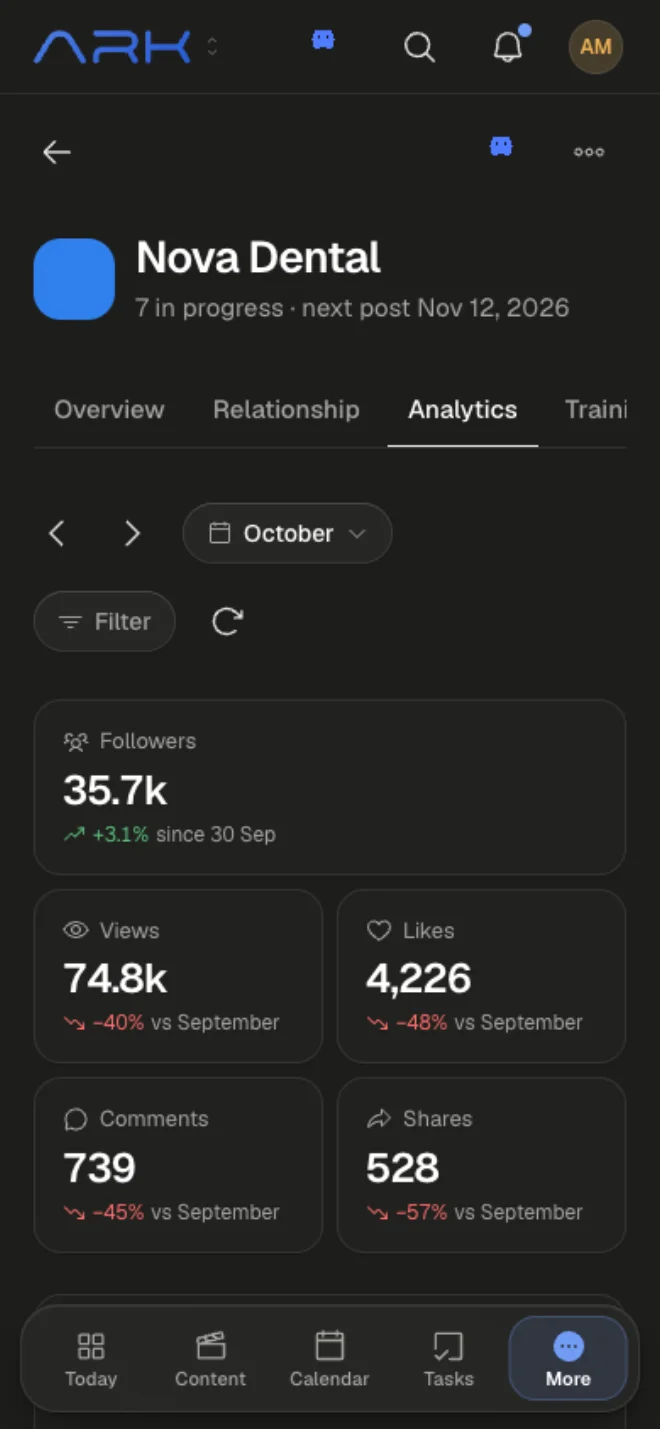
    See followers, views, likes and shares for every client, and how much you delivered compared to what you promised. Print a report for the client in one click.

    • Stats for each client, or all of them together
    • What you promised vs. what you delivered
    • Ark AI suggests what to post more of

Ready on day one

Don't start from a blank board. Use a workflow that works.

Ark comes set up with the 10-step process we use at our own agency, with a checklist for every step.

  1. Brief
  2. Script
  3. Internal review
  4. Script approval
  5. Shoot
  6. Edit
  7. Quality check
  8. Client review
  9. Schedule & post
  10. After posting

A checklist for every step

11 ready-made guides (SOPs) for things like shoot days, client feedback, posting and the monthly report. In English and Romanian.

A person on every step

Everyone can see whose turn it is, so nothing gets stuck.

Make it yours

Edit any checklist. On Pro, rename the steps or use a shorter flow for posts and designs.

Running your agency

Not just content. Contracts, passwords and invoices too.

Every client has one page with everything about them: their content, contract, logins, invoices and notes. No more searching through five apps.

The overview shows every client, what's late and the hours spent.

Contracts signed online

Send a link, the client signs, and you keep a record of what they signed.

Client passwords, stored safely

Clients type their logins into a secure link. No more passwords in chat.

Invoices

Attach invoices to each client. They only see their own.

Promised vs. delivered

See what you owe each client this month and what's already done.

A simple CRM

Keep track of leads and follow-ups next to your clients.

Time tracking

Finished tasks are logged for you. Start a timer when you need one.

Ark AI

An assistant that knows your clients. Just ask.

Ask what's late, get a script in the client's voice, or plan next month. It asks before it changes anything.

Ark AIExample

What's holding up Nova Dental this week?

Looked through 4 videos and 6 tasks

Two things are blocking Nova Dental:

Whitening: what actually works

Nova Dental · Script, waiting on the client since Tue

Open

Shoot day

Nova Dental · Thu 21 Oct, no editor assigned

Open
NewExplore the new Ark AI

Who it's for

Built for agencies that make content for clients.

Social media agencies

Plan the month, get captions approved, schedule the posts and send the stats.

Content and copy teams

Write scripts and captions in each client's voice, and get feedback line by line.

Video production

Plan shoots, share cuts with notes on the exact second, and follow a 10-step process.

Full-service agencies

Lots of clients and services, with contracts, passwords and invoices in one place.

Why we built Ark

“I was paying for like 3 tools just to get the most basic jobs done. Now its one subscription to rule them all. Literally everything you need to run your agency in one app”

Filip Bonce, founder. Our own video agency, Ark Visuals, runs all its clients on Ark.

Integrations

Works with the tools you already use.

All integrations

Google Calendar

Scheduling

The Ark calendar with meetings synced from Google Calendar and the month's posts.

Every shoot, meeting and deadline in Ark shows up in Google Calendar, and changes made there come straight back. Invites go out to the crew and the client, and their replies show in Ark.

Plans and pricing

One price for the whole team. Not per person.

Free

$0 / month

For a freelancer or a duo with a few clients.

  • 2 team seats
  • 3 active clients, unlimited client logins
  • 20 new posts a month
  • 1 GB of storage, files up to 500 MB
  • Content board, calendar, tasks and client approvals
  • The 10-step workflow and 11 checklists, in English and Romanian
  • Contracts clients sign online
  • A simple CRM for leads and follow-ups
Open ArkStart free

Pro

$19 / month

Early-access price · locked for life

Everything included, for a team of up to 6.

  • 6 team seats
  • Unlimited clients and posts
  • Agency overview, more board layouts and shared views
  • Social media stats and PDF reports for clients
  • 100 GB of storage, files up to 5 GB
  • Ark AI across the workspace (5M tokens a month)
  • AI that drafts contracts and reads what you promised
  • Your own workflow steps and templates
  • Your logo, and control over who sees what
Open ArkStart with Pro

Custom

Let's talk

Bigger team, several brands or special terms? Let's talk.

  • As many seats as you need
  • Storage for all your footage and files
  • Everything in Pro
  • Onboarding call and priority support
  • Pay by invoice
Talk to us

Questions

What agency owners ask us first.

An app for agencies that make content for clients. You plan the posts and videos, the client approves them, you schedule them and track the results. Contracts, passwords and invoices for each client are in there too.

Yes. Most of Ark is about posts, captions, approvals, scheduling and stats. If you never film, the shoot parts stay out of your way. On Pro you can switch to a shorter approval flow or a design flow.

No. Clients join for free and only see their own work.

They don't install anything. They open a link on their phone, leave a comment and tap Approve. For posts, you can send a link they open without an account.

Pro is $19 a month, or $190 a year, during early access. If you subscribe now, you keep that price for as long as you use Ark, even when the price goes up for new agencies and even if you cancel and come back.

No. Start with one client. Put next month's content on the board, send them the approval link and see how it goes. Move the rest when you're ready.

No. You can edit every checklist. On Pro you can also rename, reorder and recolour the steps, or start from a different workflow.

From our own video agency, Ark Visuals in Oradea. We use them with our clients every day.

You could. The hard part is keeping it working: calendar sync, making sure clients only see their own work, and improving it every week. With a subscription, that's our job.

Don't move everything. Start with one client.

Add next month's content for one client and send them the approval link. You'll know after the first round.